

Order tags and Cleverific
Updated 2 weeks ago
Cleverific tags orders whether you edit them in the app, create them in the backend, or your customers edit them in Customer Portal. Existing order tags are carried over after edits. This article lists the tags Cleverific adds and what each one means.
Orders edited in Advanced Mode
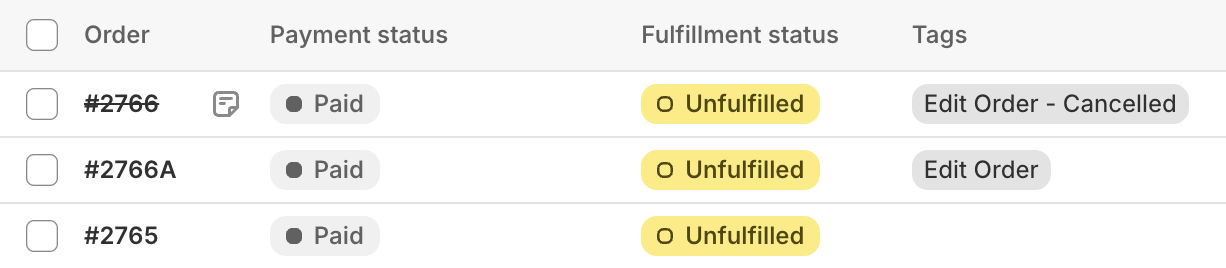
When you edit an order in Advanced Mode, Cleverific tags both the cancelled original order and the new edited order:
Edit Order - Cancelled: For the cancelled original order.
Edit Order: For the edited order.
Orders edited in Customer Portal
You'll see the following tags depending on the actions your customers take:
Edit Order - Edited by Customer: When your customer edits the order in Customer Portal.
Edit Order - Cancelled by Customer: When your customer cancels the order in Customer Portal.
Edit Order - Test Order: When you create a test order from your Customer Portal settings. Orders with this tag skip Customer Portal's usual editability checks, so you can test edits on them. Remove the tag from any order that should be treated like a real one.
You can also add a second, more specific tag that summarizes what the customer changed, such as a quantity increase or a new shipping address. To enable it, see Tagging orders with a summary of the customer's changes in Customer Portal.
Orders processed by Shopify Flow actions
Cleverific's Shopify Flow actions tag the order they ran on, so you can build automations and reports on top of the result.
Edit Order - Flow Completed: The edit action finished successfully.
Edit Order - Flow Failed: The edit action couldn't be completed.
Edit Order - Flow Action followed by the name of the action: Added next to Flow Completed or Flow Failed, to show which action ran.
Edit Order - Add Items Action Processed: The Add items action has run on the order.
Edit Order - Custom Action Processed: A custom Cleverific Flow action has run on the order.
Edit Order - Expand Bundles Completed: The Expand bundles action finished successfully.
Edit Order - Expand Bundles Failed: The Expand bundles action couldn't be completed.
Flow tags are added to the tags already on the order. If you use them as a trigger in another Flow, filter on the exact tag text, including the hyphen and the spaces.
Filtered order view in Shopify
You can filter your Shopify order list by any of these tags to get an overview of the orders edited through Cleverific or Customer Portal.
Read more about this in this article from Shopify Help Center.