

Post-purchase funnel targeting rule types
Updated 4 weeks ago
Cleverific offers multiple rule types you can combine to control which orders see a post-purchase funnel. This article explains which rule types are available and how each one matches orders.
Available rule types
You can add rules from the funnel's targeting section, covered in Setting up a post-purchase offer with Cleverific. By default, the funnel shows only when every rule on it matches.
Once a funnel has two or more rules, you can change this under Orders must match. Choose all conditions to require every rule, or any condition to show the funnel when at least one rule matches. Funnels higher in the priority list still win.
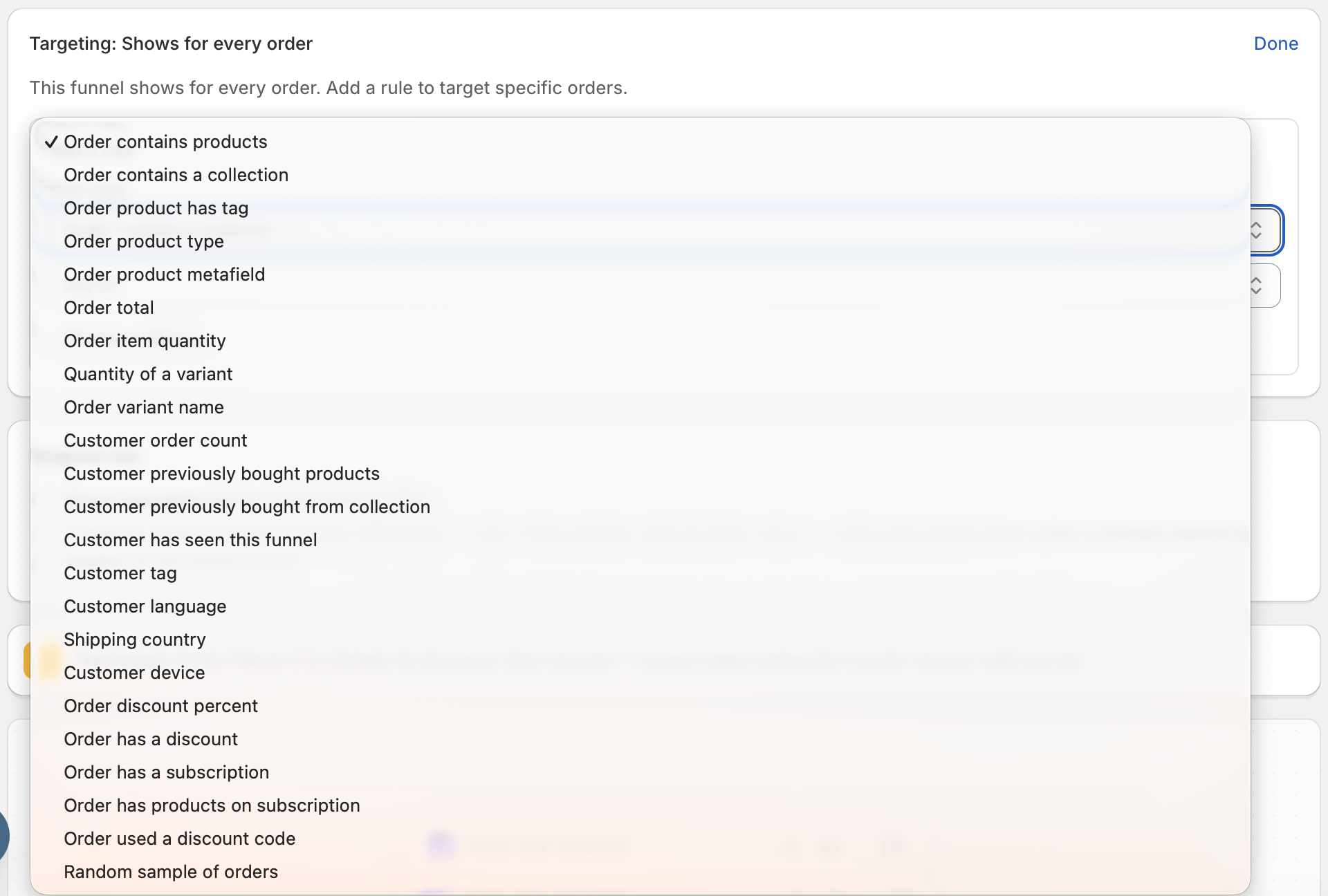
Order contains products: show or skip the funnel based on specific products in the order (any of / all of / none of).
Order contains a collection: target orders that include a product from a specific collection (any of / none of).
Order product has tag: match orders where a product carries a specific tag (any of / all of / none of).
Order product type: target by the product type of items in the order (any of / none of).
Order product metafield: match orders where a product carries a specific metafield value (has any of / has none of / has any value / is empty).
Pick the metafield from your store's metafield definitions, or type a key that has no definition as namespace.key, for example, custom.material. Values aren't case-sensitive.
Reference, JSON, and rich text metafields can only use has any value or is empty.
You can use up to 20 different metafield keys across all your funnels.
Customer order count: show the funnel based on how many orders the customer has placed, useful for targeting first-time buyers or repeat customers (equals / greater than / at least / less than / at most / between).
Customer previously bought products: show or skip the funnel based on products the customer bought in their earlier orders (any of / all of / none of).
This looks at the customer's orders from the last 60 days, not the order being placed now. Guests and first-time customers have no history, and cancelled orders still count.
Customer previously bought from collection: show or skip the funnel based on whether the customer bought a product from a specific collection in their earlier orders, using the same 60-day history (any of / none of).
Customer has seen this funnel: show the funnel only once per customer, or only to customers who have seen it before (never / before). never is the default. A customer has seen the funnel when one of its offers appeared on an earlier order, whether they accepted or declined it.
Customers are recognized by the email used at checkout, so repeat guests count too. A checkout left before payment doesn't count as seen, and views from before this rule became available don't count.
With any condition selected, a never rule matches every guest and first-time viewer on its own, so the funnel shows to them whatever your other rules say.
Customer tag: target customers who have a specific tag on their account (any of / all of / none of).
Customer language: match orders based on the customer's storefront language. A rule for "pt" also matches regional variants like "pt-BR."
Customer device: show the funnel only to customers checking out on a mobile or desktop device (is mobile / is desktop). Tablets and iPads usually count as desktop. If the device can't be detected, the funnel doesn't show.
Shipping country: target orders based on their shipping country, searched and picked by name (any of / none of).
Order discount percent*: match orders where a discount of a specific percentage was applied (equals / greater than / at least / less than / at most / between).
Order has a discount*: show or skip the funnel based on whether any discount is present (is present / is absent).
Order has a subscription: show or skip the funnel based on whether the order contains an item bought on a subscription plan, such as "Subscribe and save", prepaid, or "try before you buy", through any subscription app (is present / is absent). A one-time purchase of a product that also offers a subscription doesn't count.
Order has products on subscription: show or skip the funnel when specific products are in the order on a subscription plan (any of / none of). A one-time purchase of the same product doesn't count, so pick products you sell with a subscription option.
Order used a discount code*: target or exclude orders that used a specific discount code, matched exactly and not case-sensitive (was used / was not used). If the code can't be confirmed at checkout in time, the order is treated as no code used, so an include rule stays hidden and an exclude rule still shows.
Order total: match orders based on their total value, including tax and shipping (equals / greater than / at least / less than / at most / between).
Order item quantity: match orders based on the total number of units in the order (equals / greater than / at least / less than / at most / between).
Quantity of a variant: match orders based on how many units of a specific product variant they contain (equals / greater than / at least / less than / at most / between).
An order that doesn't contain the variant counts as a quantity of 0, so a "less than" rule can also match orders that don't have the variant at all.
Order variant name: match orders where a purchased variant's name contains a word you enter, such as a size or a color (any of / none of).
Matching ignores case, so "Large" matches "Red / Large," and "XL" also matches "XXL." Products without options have the variant name "Default Title."
Random sample of orders: show the offer to a random percentage of orders, from 1-99%. The same order always gets the same result if the customer reloads the post-purchase page.
*Note: Discount code rules require Shopify Plus, since they rely on a checkout extension that only runs on Plus stores.